Achievements

Showing posts with label Gracielle Designs. Show all posts

November 3, 2020

Graciellie Designs - Live for Today

 Hello!

I'm popping in today to share a card I made with Graciellie Designs new digital stamp set, Live for Today! A beautiful winter bird with great sentiments!! 

I started by opening the bird in Word. I resized it and added the Live for Today sentiment. Then I printed it out and used my Copic markers to color it up. Instead of really blending the coloring, I did a more stippling like technique to dot the color and blend it. Then I fussy cut most of the image out, using my paper trimmer to cut the sentiment. 

For the background I decided to pick out a dark red card base and use my Wow Embossing Fab Foil. I started with Funky Fossil Designs Snow Flurry stencil and watermark ink. I only inked up the top half of the card base.

Then I added Wow Embossing Bonding Powder to the watermark ink and heated it. With Wow Fab Foil, I added the white foil, shiny side up onto the melted powder. 


Next, I heated up my regular cloths iron and placed my card base face down, opened the card and ironed the back of the front card base. Trim off any access foil as you don't what it to melt to your iron. I did this a few times, letting the card stock cool in between. The hardest part is the edges and the top, I think I get it all but there's usually a few spots I miss!! lol!!

After the card has cooled I pulled the foil and and wa-la I have my foiled white snowflakes! I always keep what I pulled up, down the road I'll use it on a card!!

Last I added the bird and sentiment to the card with foam tape! 

Thanks for stopping by!

Dana

October 19, 2020

Graciellie Designs - Start Anew Magnolias

 Hello!!

I'm stopping with a second card I made with Graciellie Designs new Start Anew Magnolias digital stamp set. The set has two floral clusters and like always amazing sentiments!!

I started by pasting one of the floral clusters in Word and resizing it. I added a sentiment and printed both out. Then I used my Copic markers to color the image. 

From my stash I found some silver glitter card stock. I adhered it to the front of a white card base. 

Next, I cut my image into three equal parts. I used some washi tape and adhered my cardbase to my glass mat, using the lines to keep the card straight. Then I went about added the three image stripes with foam tape, using the lines on my mat to keep each section equal and have equal spaces between them. I trimmed off the over hang.

Last, I trimmed the sentiment down and adhered it to the front of my card. Thanks so much for stopping by!!


Dana

October 15, 2020

Graciellie Designs - Start Anew Magnolias

 Hello!

I'm sharing a card for a new Graciellie Designs digital stamp that just came out!! It's gorgeous!! Called Start Anew Magnolias, a gorgeous winter flower cluster! There is also a mini set that I used one of the sentiments from, its called Festive Swag.


I opened the image in Word, resized it and added the sentiment from Festive Swag. I printed the image and used my Copic markers to color it. 

Then I cut the image out with a panel die. I wanted a little bit of sparkle, but didn;t want to add sequins or enamel dots. So I used a sparkle pen to color the main Magnolia flower. \

I adhered the panel to the a white card base and then rounded the corner. The card is all about the big flower!! 

Thanks so much for stopping by!!

Dana 

October 6, 2020

Graciellie Designs - Christmas Wishes

 Hello!!

Today Graciellie Designs has a new release!! New digital stamps called Christmas Wishes! Gorgeous poinsettia with fabulous sentiments!!


I decided to do no line coloring and to achieve that with a digital stamp I pasted the poinsettia in Word and resized it. Under Picture Tools I clicked on the drop down Color menu and picked the Washout option. I have stopped here before, the gray is still fairly dark and can be seen with your coloring. 

This time I went farther to see what what would happen. Below the Color menu is a Transparency drop down. From here I picked Transparency 80%, its really light and I did use another image I printed as a guide to use as I colored the image. To color the image I used my Spectrum Noir Colour Blend pencils. 

Before printing I added the Joy & Peace sentiment, leaving it black so it could be seen after coloring. With a stitched rectangle I cut the colored poinsettia and then adhered it to a Kraft card base. Last I added clear and black sequins for a little sparkle!

Thanks so much for stopping by!! Make sure to stop by Graciellie Designs to pick up this set!!

Dana 


October 1, 2020

Graciellie Design - Simply Blessed

 Hello!

I have a second card featuring Graciellie Designs Simply Blessed digital stamp set. Perfect for the fall, and I went a little bit fall with this card!

I started by added two of the foliage  bundle to the card, along with a sentiment. After resizing them I printed it out.


Next, I used my Copic markers to color the images. I went with a rustic fall look using orange, red and a little light brown.


Then I used Distress Inks to make it look a bit vintage/fall like. I started with Antique Linen, adding ink at the edges and filling in to cover the panel. Next, I used a couple more Distress Inks to darken the edges, leaving the center the lightest color.


I decided not to add any sparkle or embellishment to let the coloring and inking shine!

Thanks so much for stopping by!!

Dana

September 23, 2020

Graciellie Designs - Simply Blessed

 Hello!!

I'm popping in today with a card featuring Graciellie Designs newest digital stamp set, Simply Blessed! This gorgeous set is perfect for fall or really even time if you are so inclined!! 


I started my card by first opening the image in a Word document and resizing. I added the sentiment and printed it out. Then I pulled out Copics and colored the image. 

With a rectangle die I cut the image out, with the jar in the bottom left corner. With sharp scissors I fussy cut around the image and sentiment on the right side. 

For the background I used Wow Embossing Bonding Powder with a Hero Arts stencil and versamark ink. I used my heating gun to melt the powder. Then I placed the Wow foil, colored side on top over the melted powder. 

To have the foil stick to the melted powder I used an iron on the wrong side of the paper. This was the first time I've done this and it worked pretty well. I did miss, I think with the iron, the top part of the card, but over all you get a nice distress look as its not 100% perfect. Great way to use foil with out the a heating plate system.

I added the colored image with foam tape. I keep the left over sheet from my project to use on a future project. 

Thanks so much for stopping by!!

Dana

August 25, 2020

Graciellie Design - Grace Upon Grace

 Hello!!

I'm popping in today with a card featuring a new digital stamp set from Graciellie Design!! It's called Grace Upon Grace, it has gorgeous flowers and fabulous sentiments!!

I opened the flower cluster in Word, resizing it along with a sentiment. Then I printed it out and used my Copic markers to color it. With sharp scissors I fussy cut the flowers out. 

Next, I pulled out a Hero Arts Stencil and a pink, green and yellow distress inks. I used my Taylored Expressions Blender Brushes to ink up a card base with the stencil and inks.

I added the colored flower cluster to the card with foam tape, then trimmed and added the sentiment. 

Thanks so much for stopping by!!

Dana

August 14, 2020

Graciellie Designs - Simplicity

 Hello!

I'm stopping by with a second card featuring Graciellie Designs new digital stamp set Simplicity! Gorgeous sprig of greenery with fabulous sentiments!!

Dana Warren - Kraft Paper Stamps - Graciellie Designs - Wow Embossing Powder

I started by pasting a few of the image in Word and resizing them. Then I printed and fussy cut each one. I ended up only using two of the four I printed, I'll use the others on future cards. 

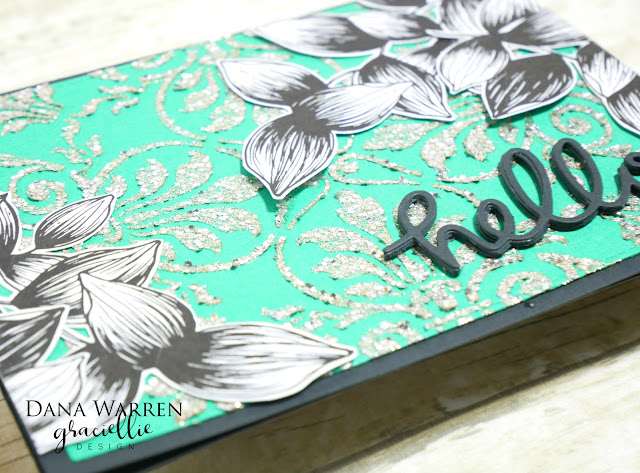
Then I decieded to leave the images uncolored so they would better stand out with a sparkley background. I used Funky Fossil Designs - Nouveau Tile stencil with Wow Embossing Powder glitter Celebration.

Dana Warren - Kraft Paper Stamps - Graciellie Designs - Wow Embossing Powder

To create my sparkly background I used the glitter with transparent paste. I of course made too much so after using the Nouveau Tile stencil I pulled out other panels and stencils and used up the rest of my glitter paste.

Dana Warren - Kraft Paper Stamps - Graciellie Designs - Wow Embossing Powder

While the background was drying I pulled out an older Hello die and cut it with black card stock four times. Then I adhered each together to layer it up. This is what you do when you thought you printed a sentiment, only to find you didn't!

Dana Warren - Kraft Paper Stamps - Graciellie Designs - Wow Embossing Powder

I adhered my glittered panel to a black card base. Then I added the images with liquid adhesive. I trimmed off the over hang and then added them on top, creating two layers of the images. Last I adhered my Hello sentiment. 

Dana Warren - Kraft Paper Stamps - Graciellie Designs - Wow Embossing Powder

Thanks so much for stopping by!!

Dana


August 10, 2020

Graciellie Designs - Simplicity

 Hello!!

I'm stopping in with a card featuring a new digital stamp set from Graciellie Design - Simplicity!! Gorgeous greenery with fabulous sentiments! 

Dana Warren - Kraft Paper Stamps - Graciellie Designs Wow Embossing Powder

I started by adding the greenery to a Word document, then I changed the color to grey. Then I added the sentiment and printed the page. 

Dana Warren - Kraft Paper Stamps - Graciellie Designs Wow Embossing Powder

Next, I used an orange alcohol marker to color the whole image. Then I used a watermark pen to color in the printed parts of the image, the edges and of image and feathering out into each leaf. I added Wow Embossing Powder Sunset Boulevard and heat embossed it. Then I fussy cut the greenery, leaving a white border.  

Dana Warren - Kraft Paper Stamps - Graciellie Designs Wow Embossing Powder

From my stash I found some light orange card stock and used one of the Waffle Flower A7 Disc Bound Die. I added the die cut card stock to a gray card base. 

Dana Warren - Kraft Paper Stamps - Graciellie Designs Wow Embossing Powder

Then I added the sparkly greenery to the card with foam tape and then added the sentiment on top with foam tape too.

Thanks so much for stopping by!!

Dana

August 4, 2020

Graciellie Designs - Relax

Hello!!

Happy Tuesday! Today I am sharing a card I made with new Graciellie Designs Relax digital stamp. I was in the watercolor mood and this stamp set is perfect for it!! With a quick google search you can see how colorful it is!!

Dana Warren - Kraft Paper Stamps - Graciellie Designs - Altenew Watercolor

I opened the flower image in a word document and enlarged it. Then I added the Relax Unplug. Unwind. Breathe. sentiment below the flower and printed it out on watercolor card stock.

Dana Warren - Kraft Paper Stamps - Graciellie Designs - Altenew Watercolor

Next, I used my Altenew watercolors to color the flower. After it was dry, I added a little bit of grey watercolor around the flower to give it some shadows. When that was dry I used watercolors to add splatters of orange and black.

Dana Warren - Kraft Paper Stamps - Graciellie Designs - Altenew Watercolor

I used a stitched rectangle to cut out the colored image and adhered it to a black card base. To add a little sparkle I added some purple and orange rhinestones.

Dana Warren - Kraft Paper Stamps - Graciellie Designs - Altenew Watercolor

Thanks so much for stopping by!!

Dana

July 27, 2020

Graciellie Designs - Relax

Hello!

I'm popping in with a card I made with Graciellie Designs new Relax digital stamp set! Gorgeous exotic flower with fabulous sentiments!!

Dana Warren - Kraft Paper Stamps - Graciellie Designs - Wateroloring

I printed the flower and sentiment on watercolor card stock. Then I used my Altenew Watercolor set to color it up. When my coloring was dry, I used yellow and orange to add some splatters.

Dana Warren - Kraft Paper Stamps - Graciellie Designs - Wateroloring

When everything was dry I used Spellbinders circle dies to cut three circles of the same flower. I used a large, medium and small circle for the flower and an even smaller circle for sentiment.

Dana Warren - Kraft Paper Stamps - Graciellie Designs - Wateroloring

I played with the layout a little and then added each of the circles with foam tape. The sentiment circle was adhered on top of the other circles with foam tape. Last, I added a few orange sequins.

Dana Warren - Kraft Paper Stamps - Graciellie Designs - Wateroloring

Thanks so much for stopping by!!

Dana

July 14, 2020

Graciellie Designs - Coffee & Ice Cream

Hello!!

I'm popping by with a new card I made with Graciellie Designs New Coffee & Ice Cream digital stamp set!! Perfect for these warm days! Who doesn't like coffee and ice cream?!?!?!

Dana Warren - Kraft Paper Stamps - Graciellie Designs - Ice Cream

My card today features the ice cream cone image, the one with three ice cream scoops! I used my Copic markers to color each scoop as a rainbow! So fun!! I thought the rainbows are perfect with the Vanilla sentiment!!

Dana Warren - Kraft Paper Stamps - Graciellie Designs - Ice Cream

I used a rectangle die to cut the image and sentiment, then I fussy cut around the left side of the ice cream. From my stash I found a panel of gold glitter paper and I adhered it to a white card base.

Dana Warren - Kraft Paper Stamps - Graciellie Designs - Ice Cream

Last, I added the colored image panel, having the right side line up with the right side of the card base. This way you can see the gold panel on the left side.

Dana Warren - Kraft Paper Stamps - Graciellie Designs - Ice Cream

Thanks so much for stopping by!!

Dana

June 26, 2020

Graciellie Designs - Words of Hope

Hello and Happy Friday!

 Today I have a card featuring Graciellie Designs new Words of Hope digital stamp set! Gracie has a new May/June Bundle 2020 Bundle and its on SALE!!! Yay!! I would snap this up now, its full of gorgeous images and fabulous sentiments! Please note my Graciellie Designs links are affiliate links.

Dana Warren - Kraft Paper Stamps - Graciellie Designs

I added the lone orchid image to a word document, then made it bigger. I also added an leaf and a sentiment. Then I printed it out and used my Copic markers to color it the images. With sharp scissors I fussy cut the flowers and leaves out.

Dana Warren - Kraft Paper Stamps - Graciellie Designs

Next, I used a Crafter's Companion background die to cut some light purple card stock. I adhered this panel to a black card base.

Dana Warren - Kraft Paper Stamps - Graciellie Designs

I trimmed the sentiment and added it to my card, then I added the orchid and leaves to the card with foam tape. Then for some sparkle I added some purple rhinestones following the pattern of the purple background die cut.

Dana Warren - Kraft Paper Stamps - Graciellie Designs

Thanks so much for stopping by!!

Dana