Achievements

Showing posts with label Christmas. Show all posts

November 12, 2020

Coffee Loving Cardmakers Fall/Winter Blog Hop - Card 6

 Hello!

I'm popping in real quick today with a sneak of my 6th card for the Coffee Loving Cardmakers Fall/Winter Blog Hop!! I'm on the CLC blog today, so you will have to go there to see my card! Below is a little peek, I hope you will check it out, here!!


Dana

November 10, 2020

Coffee Loving Cardmakers Fall/Winter Blog Hop - Card 4

 Hello!

The Coffee Loving Cardmakers Fall/Winter Blog Hop is in full swing!! Make sure to check out the coffee/tea/cocoa inspiration and play along for your chance to win some prizes! Check out the CLC blog for all the details.

My card features Dare 2B Artzy Perfect Blend stamp set! I started with Funky Fossil Designs Festive Word die and used three colors of Catherine Pooler ink to blend. I was going for a little bit mod with the colors only in the background!

Then I used a stitched rectangle to cut out the background. From the Perfect Blend stamp set I stamped the coffee cup on white card stock with black ink. I thought about coloring it, but in the end I liked the look of the black and white against the colorful blended background!

Next, I adhered the inked background to a black card base and added the coffee cup with foam tape. Below the coffee cup I stamped the sentiment You Warm My Heart. 

Last, I tied a tiny black twine bow and added it to the coffee cup. It needed something else, but sequins and enamel dots were not doing it for me!

Thanks so much for stopping by!! I'll be back tomorrow with another coffee themed card!!

Dana

October 6, 2020

Graciellie Designs - Christmas Wishes

 Hello!!

Today Graciellie Designs has a new release!! New digital stamps called Christmas Wishes! Gorgeous poinsettia with fabulous sentiments!!


I decided to do no line coloring and to achieve that with a digital stamp I pasted the poinsettia in Word and resized it. Under Picture Tools I clicked on the drop down Color menu and picked the Washout option. I have stopped here before, the gray is still fairly dark and can be seen with your coloring. 

This time I went farther to see what what would happen. Below the Color menu is a Transparency drop down. From here I picked Transparency 80%, its really light and I did use another image I printed as a guide to use as I colored the image. To color the image I used my Spectrum Noir Colour Blend pencils. 

Before printing I added the Joy & Peace sentiment, leaving it black so it could be seen after coloring. With a stitched rectangle I cut the colored poinsettia and then adhered it to a Kraft card base. Last I added clear and black sequins for a little sparkle!

Thanks so much for stopping by!! Make sure to stop by Graciellie Designs to pick up this set!!

Dana 


September 20, 2020

My Favorite Things Stamps - Innovation Master

 Hello!

This is my last card for My Favorite Things Stamps 2020 Card Design Superstar. It's for the Innovation Master category. Be warned it has a lot of pictures!!!

I wasn't planning on entering one for this, but Friday night after work I was trying to fall asleep, my mind was wondering and I started thinking about what I could do. Eventually I though about making an magnetic card with images that can me moved around and then can make their way to a fridge or other magnetic board. 

So I made a trip to Michael's yesterday and found some magnetic sheets and gave it try! I used MFT Jingle All The Way and stamped all the main images and then stamped the presents, reindeer and Christmas tree three times. 

The above card is the card I'm entering in the contest. But at the end I had so many images, that I made another card and I still had a few left over. So I figure I'll include a little bag with the extra's, that way a kid can play with a bunch of images. Oh, and as you can see the magnet images stay in place even when the card is standing.


The magnet sheets came rolled up, so while I was coloring and die cutting the images I put the sheets under my glass craft mat so they would flatten a little!

After a lot of coloring I trimmed a magnet sheet, so it was about 1/2 inch smaller then my card bases. I used foam tape to adhere the magnet panels to the card bases. 

For the images I used the image dies to cut the magnet sheets, then adhered each image to the matching magnetic cut. Next, I stamped two sentiments and then adhered them to the magnet sheet and trimmed them up.


The next photo's I moved the images around, so they are different from the images above!


Thanks so much for stopping by!! I hope you have a wonderful Sunday!!

Dana

September 19, 2020

My Favorite Things Stamps - Clean & Simple

 Hello!

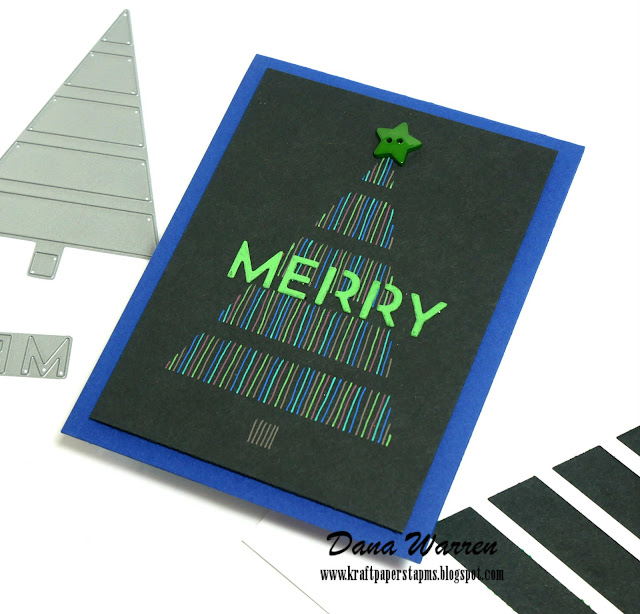
I'm back with my second card for My Favorite Things Stamps 2020 Card Design Superstar contest. This card is for the Clean & Simple category. And like my first card this one is a Christmas card, too.

For this card I use a very old MFT die called Christmas Tree Cutout. I started by cutting the tree out from some scratch white card stock to make a 'stencil.' In the photo I placed black card behind my die cut so it would be easier to see in the photos.

Next, I cut down a panel of black card stock so it would be about 1/4 inches smaller then my blue card base. I placed the 'stencil' over the panel and used some blue tape to keep it in place. Then I started adding vertical lines, inside each layer of the tree. 

I went with non traditional colors, more muted opaque gel pens, that show up really nice on black card stock. Starting with a line up of colors, I just went round and round threw my line up, working my way up each layer of the tree. For the trunk I used one of the colors that looks brown/grey.

Then I cut the Merry part of the die from black card stock and used one of the green gel pens to color the letters. When I do this I always color the edges, which was a little tricky with a gel pen! I did do two layers of the green to get good coverage. 

With a T-ruler, I adhered the Merry on top of the lined Christmas tree. From my stash I found the perfect green star button to add to the top of the Christmas tree. Last, I added the panel to the blue card base with foam tape!

Thanks so much for stopping by! I'll be stopping by tomorrow with my last card for the Card Design Superstar contest!

Dana


My Favorite Things Stamps - Coloring Virtuoso

 Hello!

Today, I'm sharing a card I made for the My Favorite Things Stamps - 2020 Card Design Superstar, Color Virtuoso. Instead of the usual coloring with alcohol and blending, I used stippling as my coloring. It's also called pointillism. I've been wanting to do something like this for awhile but when I saw the design contest, I thought it was time! I did pointillism way back in my high school art classes!

I pulled out all my MFT stamps and dies and was feeling Christmas-y, as all three cards for the contest are Christmas! For this card I went with Jingle All The Way.  I stamped one of the santas, little girl and presents.

For my stippling I used some fine point colored markers. When stippling, you randomly add the dots. The more dots go where its darker. I also mixed a couple of the colors together. Two browns for the ground and two skin colors. 

I added light blue dots for a sky and stamped Jingle All The Way above the images. Then I trimmed it down so it was about 1/4 smaller then my blue card base. 

Thanks so much for stopping by! I'll be back later tonight with my second card and then share my third card tomorrow!

Dana

November 19, 2019

Graciellie Designs - Festive Poinsettia

Hello!!

I'm stopping by with a card featuring a new Graciellie Design!! A gorgeous Christmas digital stamp set, Festive Poinsettia is a must have!! Fabulous images paired with many sentiments, perfect for your Christmas card making!!

Dana Warren - Kraft Paper Stamps - Graciellie Designs - Copic Markers

My card today features the single poinsettia and a few of the holly and leaves! I used Word to add the images and resize them. I also added the Christmas Cheer sentiment because it was one of the thicker sentiments.

Dana Warren - Kraft Paper Stamps - Graciellie Designs - Copic Markers

After printing it out I decided to do something a little different and color the image in a monochromatic tone! I pulled out a few warm grey Copic markers to color the image.

Dana Warren - Kraft Paper Stamps - Graciellie Designs - Copic Markers

Next, I cut the image out with a rectangle A2 card base die. Then I trimmed away part of the white card base. I added the image to a red card base with foam tape.

Dana Warren - Kraft Paper Stamps - Graciellie Designs - Copic Markers

Last, I wanted a little bit of sparkle, so I used a clear glitter pen to add the sparkle to the flower. Then I added a few matching rhinestones. It's hard to get a good photo, but you can see a little bit of of the sparkle in the photo above!

Thanks so much for stopping by!! Have a great day!!

Dana

October 6, 2019

Be Merry with Pinkfresh Studio

Hello again!!

My next card I made yesterday for World Cardmaking Day was made for Pinkfresh Studio Challenge #2! The challenge is to make a Christmas card. I only have one Pinkfresh Christmas set so I paired it with a non-Christmas set!

Dana Warren - Kraft Paper Stamps - Pinkfresh Studio

I started with Simply Succulents and stamped the pot and two cactus/succulents. Then on another piece  of card stock I stamped the flower and bird from December Days stamp set.

Dana Warren - Kraft Paper Stamps - Pinkfresh Studio

Then I fussy cut the flowers and birds out and adhered them to the succulents. I stamped Be Merry in brown ink below the pot. Then I used a fancy rectangle die to cut it all out.

Dana Warren - Kraft Paper Stamps - Pinkfresh Studio

From my stash of extra's I pulled out a watercolor smooching background that actually matched the color of succulents. I wrapped some twine around the panel and tied it in a bow. Then I added the stamped image with foam tape.

Thanks so much for stopping by!!

Dana

December 5, 2018

Sana Claus is Coming to Town

Hello!!

I'm on the Art impressions blog today!! I can't believe it's December already!! That means Christmas is right around the corner!! My card today features the new Sleigh Bells stamp set!! 

Dana Warren - Kraft Paper Stamps - Art Impressions - Christmas

I started with a small panel of cardstock and used my Spectrum Noir Inkpads to ink a blue sky, I was going for night and in hindsight could have added a little black! But I like it anyway!! Once I had it all inked I set it aside to try while I stamped and colored my images.

Dana Warren - Kraft Paper Stamps - Art Impressions - Christmas

I stamped the santa and reindeer images on white cardstock and used my Spectrum Noir Markers to color them. I used: CG3, CG4, R4, DR5, DR6, DR7, EB1, EB2, EB5, EB6, GB4, GB5, GB8, IG6, IG10. Then I fussy cut out the images.

Dana Warren - Kraft Paper Stamps - Art Impressions - Christmas

Next, I adhered the inked panel to a navy blue cardbase and then added the Santa directly to the panel. For the reindeer I added them with foam tape. 

Dana Warren - Kraft Paper Stamps - Art Impressions - Christmas


To add a little sparkle I adhered a few snowflakes from Trinity Stamps Blizzard Shaker Embellishment mix! Last, I stamped the Santa Clause is Coming to Town in the bottom right corner

Thanks for stopping by!!

Dana

Supplies
Stamps: Art Impressions - Sleigh Bells
Spectrum Noir Inkpads 
Spectrum Noir Markers
Trinity Stamps - Blizzard Shaker Embellishment Mix

December 4, 2018

Coffee Loving Cardmakers Fall/Winter Blog Hop - Card 3

Hello!!

I'm stopping by with my third card for the Coffee Loving Cardmakers Fall/Winter Blog Hop!! I usually only have time to make two cards for the hops, but.... I should be organizing and packing up my craft stuff for a move and I keep seeing things and getting ideas! Eventually it will have to be packed up, but until then I'm enjoying having some good crafty mojo!!

Dana Warren - Kraft Paper Stamps - Erin Lee Creative - Spectrum Noir Markers

My card today features Sponsor Erin Lee Creative!! A brand new stamp company!! When I saw her new Koko Girl Couch and Koko Girl Cocoa stamps set, well I splurged because I just had to have them!! She has some other great stamps, so make sure to check out her shop!!

Dana Warren - Kraft Paper Stamps - Erin Lee Creative - Spectrum Noir Markers

I started by using a torn edge circle die and cut it from some white card stock. Then I stamped Koko from the Cocoa set. I used my Spectrum Noir Makers to color her up. I colored her cup with a gold pen.

Dana Warren - Kraft Paper Stamps - Erin Lee Creative - Spectrum Noir Markers

Next, I found some gold glitter woodgrain pattern paper from a Christmas paper pad I got last year on clearance. I added that to a white card base, then added my colored circle to the card with foam tape, trimming off the overhang.

Dana Warren - Kraft Paper Stamps - Erin Lee Creative - Spectrum Noir Markers

Then I stamped the Warmest Wishes on white card stock, trimmed it down and added it to the card. Last I added a few sequins!!

Thanks for stopping by!! Don't forget to hop along to see tons of great coffee/tea/cocoa inspiration!! Play along for your chance to win a great prize from Erin Lee Creative and the other sponsors!!

Dana

Supplies
Stamps: Erin Lee Creative - Koko Girl Cocoa
Spectrum Noir Markers: DR4, DR6, DR7, FS2, FS6, FS9, JG5, JG6, JG7, RB1, RB2, RB3, RB4, TN2
Die: Crafters Companion - Torn Edge Circle
Sequins: Lawn Fawn - Lawn Ornaments. Neat & Tangled - Classic Christmas Mix
Pattern paper: Reflections - Santa's Belt

November 1, 2018

Art Impressions Challenge - #224 Lots of Layers

Hello!!

It's the second week of Art Impressions Challenge #224 - Lots of Layers. AI also has released some great new Christmas sets!!! My card features Sleigh Bells!!
Dana Warren - Kraft Paper Stamps - Art Impressions - Fancy Pants - Christmas

I started by stamping the two fun elves in the set and coloring them with my Spectrum Noir Markers. For the girl elf I used blue to better match the pattern paper I used. The colors I used are AB4, BG7, CR7, CR11, CT4, IG1, IG2, RB2, RB4, TB1, TB4. When I was done coloring them, I fussy cut them both out.

Dana Warren - Kraft Paper Stamps - Art Impressions - Fancy Pants - Christmas

With AI's stitched rounded rectangle die, I cut some snowflake paper. I added a red pattern then the snowflake pattern to a card base, rounding its corners. Then I used a banner die and cut some more pattern paper. I stamped the sentiment and add it to my card base.

Dana Warren - Kraft Paper Stamps - Art Impressions - Fancy Pants - Christmas

Then I pulled out the matching die cuts (from Fancy Pants - Wish Season) and added trees, snowflakes and several sentiments. I layered it all together, some was added with foam tape, others directly to the card.

Dana Warren - Kraft Paper Stamps - Art Impressions - Fancy Pants - Christmas

Thanks so much for stopping by!! Make sure to play along for your chance at some great AI goodies!!

Dana

Supplies
Stamps: Art Impressions - Sleigh Bells
Die: Art Impressions - Stitched Rounded Rectangle
Pattern Paper & Ephemera - Fancy Pants: Wish Season
Spectrum Noir Markers

December 13, 2017

Christmas Duo

Hello AI fans!!

I'm on the Art Impressions with two Christmas cards, I used Ugly Sweater and Cheers to You. These were the color at about the same time, so I decided to similar backgrounds with them by splitting up a watercolor panel and using some pattern papers!

Dana Warren - Kraft Paper Stamps - Art Impressions
First, I stamped the images and used my Spectrum Noir markers to color them up. I used AG1, AG3, AG5, CT1, CT4, DR4, DR6, DR7, IG2, IG4, RB1, RB2, RB4, Black. Then I used some basic circles to cut them out.

Dana Warren - Kraft Paper Stamps - Art Impressions
For the background, I cut a panel of watercolor cardstock and did some ink smooshing with Distress Ink, Barn Door & Peeled Paint. I also used some splatters of black from a black ink spray I happened to have on my desk!

Dana Warren - Kraft Paper Stamps - Art Impressions

While that dried I stamped the sentiments for each card, one on a small die cut circle. The other from a strip of cardstock that I notched one end. 

Dana Warren - Kraft Paper Stamps - Art Impressions
When the watercolor panel was dry I cut it in half, but at an angle. That way each card gets half a watercolor panel. I added some pattern paper to the other half of each card, each one getting their own pattern.

Dana Warren - Kraft Paper Stamps - Art Impressions

The pattern paper was added directly to each card base and the watercolor half was added with foam tape. Last, I just added each stamped circle and the matching sentiment!

Dana Warren - Kraft Paper Stamps - Art Impressions

Thanks for stopping by!

Dana

Supplies:
Stamps: Art Impressions - Ugly Sweater, Cheers to You
Distress Ink: Barn Door, Peeled Paint
Spectrum Noir Markers
Pattern Paper: Echo Park Paper Co